

Modpack and plugin updates
Installing modpacks via Modrinth integration under Plugins, checking for updates, and applying changes on server restart.
Sur cette page
Minecraft & Game Servers guides
Keeping plugins and modpacks up to date patches security vulnerabilities, fixes bugs, and improves stability. The Plugins section in the panel connects directly to Modrinth, removing the need to manually download jars from external sites.
1. Installing a modpack from Modrinth#
Open the Modpacks tab
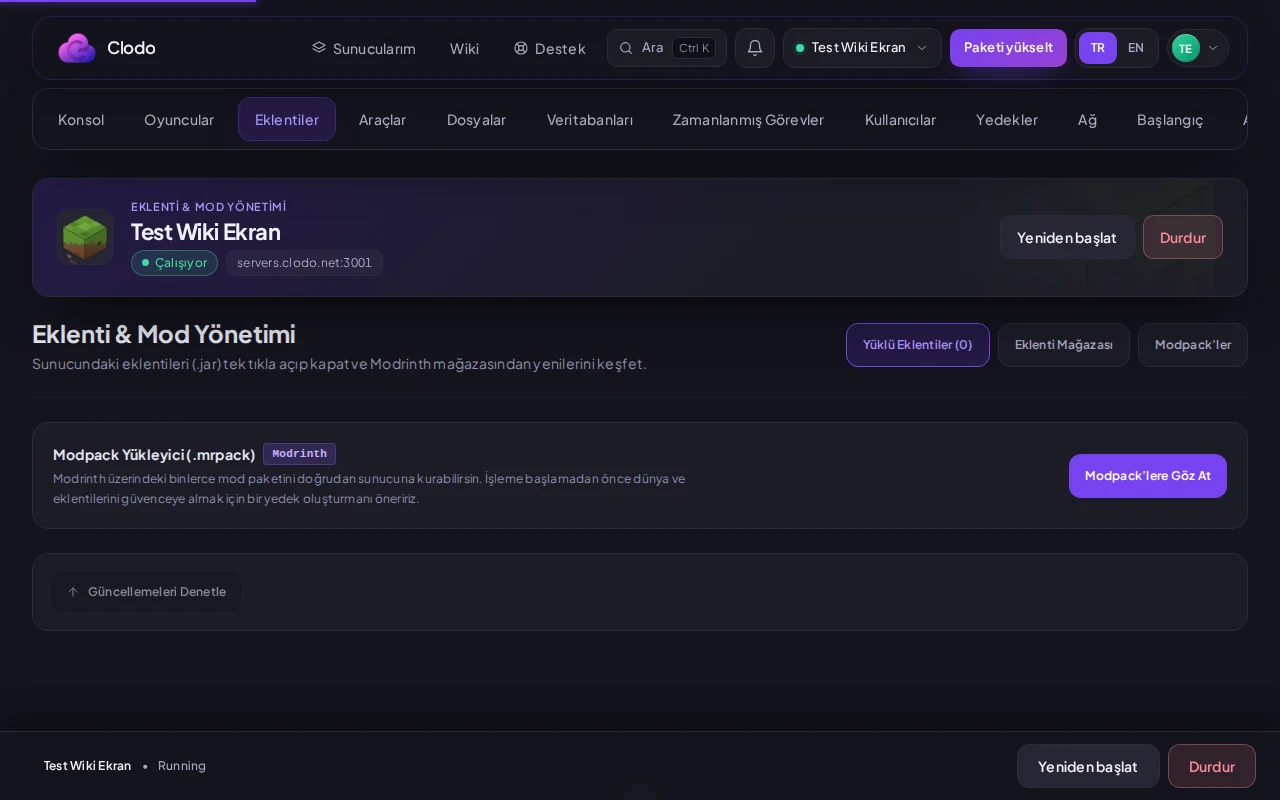
Navigate to Plugins > Modpacks in the panel. This screen searches and displays available modpacks from Modrinth.
Select and install the pack
Type the desired modpack name into the search bar. Click install on the target pack to have files deployed to your server.
2. Updating installed plugins#
Open the Installed tab
Go to Plugins > Installed to view all active plugins currently present on your server.
Check for updates and apply
Click 'Check for updates'. If a new build is available, click the Update button next to the plugin to update it in one click.
Ce guide vous a-t-il été utile ?
Les retours sont directement transmis à l'équipe qui maintient ce guide.
Vous n’avez pas trouvé de solution ?
Vous pouvez ouvrir une demande auprès de notre équipe d’assistance depuis le panneau.